目录
1. 创建项目
1.1 VSCode创建项目
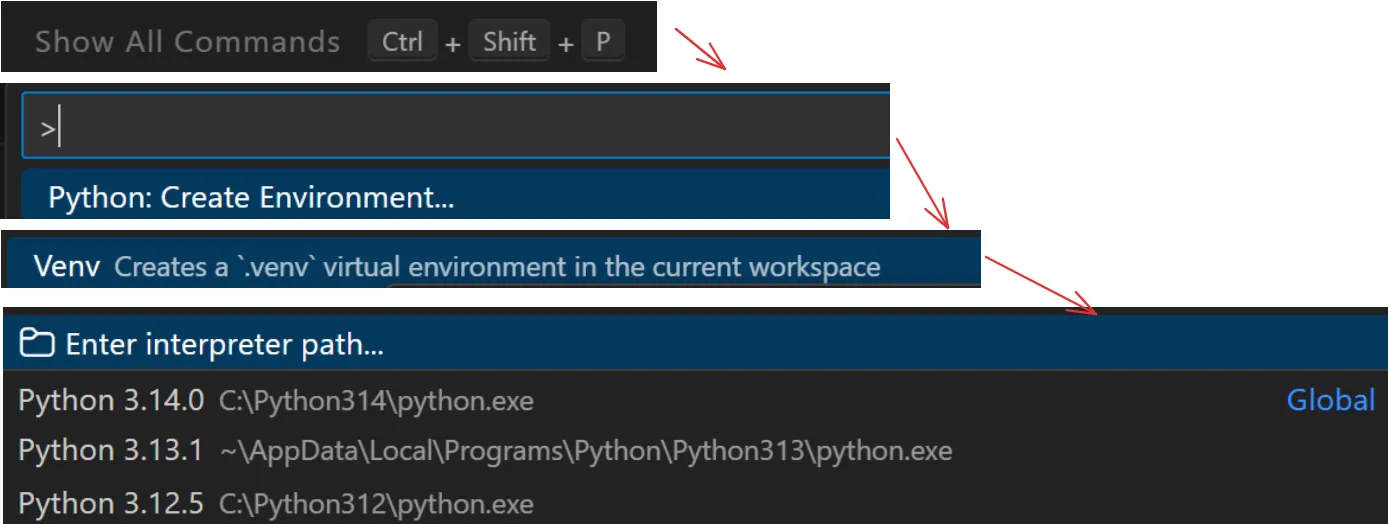
使用VS Code来创建项目。 Ctrl + Shift + P打开命令栏,选择Python Create Environment,使用Venv并确定要使用的Python的版本。
启用Python虚拟环境,查看现在的Python版本,并安装FastAPI。
cmd> .\.venv\Scripts\Activate.ps1
> Get-Command python

> python -m pip install --upgrade pip
> pip install "fastapi[standard]"
1.2 VSCode设置Git
我的Git已经设置全局账号和邮箱里。
cmd> git init

# 设置Git账号和邮箱以及仓库地址。
> git config --global user.name "Your Name"
> git config --global user.email "your.email@example.com"
> git remote add origin https://example.repo

# 检查Git的配置
> git config --global --list
2. 登录模块
将登录以及下发Token等的功能放到router/auth.py,main.py再调用它。
安装JWT,pip install PyJWT[crypto]。
本文作者:潘晓可
本文链接:
版权声明:本博客所有文章除特别声明外,均采用 BY-NC-SA 许可协议。转载请注明出处!
目录